Running the weekly round
A recurring kudos ritual in your Slack channel, with reminders, a recap, an MVP, and a nudge.
Who can use this: Owners and admins, or anyone with the Recognition permission. Needs Slack connected with a primary kudos channel.
The weekly round is a set day when everyone is encouraged to recognize someone. Pulsido posts a kickoff in your primary kudos channel, reminds people during the day, and wraps up with a recap. Matter calls this Feedback Friday. It's the single biggest driver of participation.
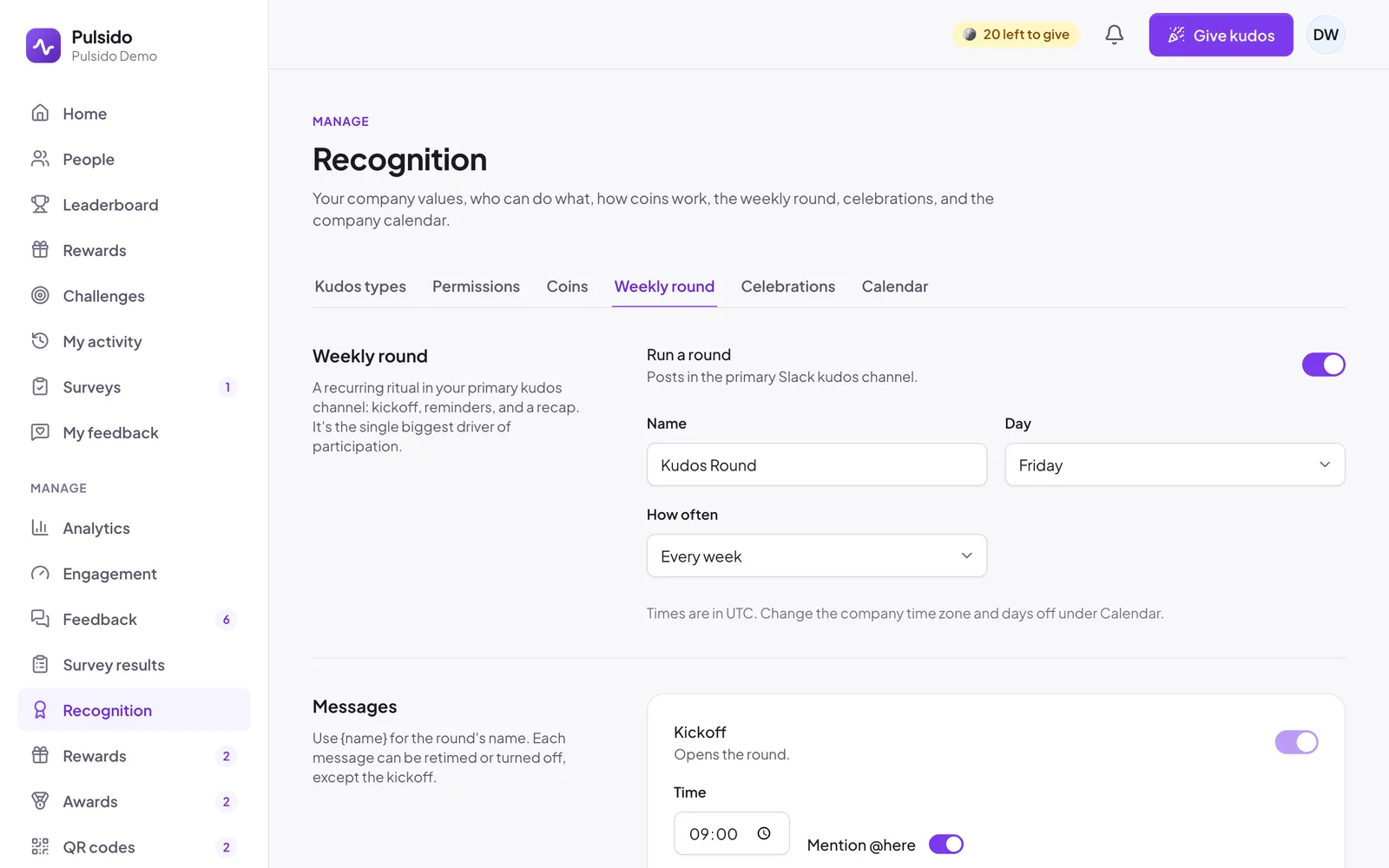
Turn it on#
- Go to Manage → Recognition → Weekly round.
- Switch on Run a round.
- Set the Day and How often: every week, every 2 weeks, or the first week of the month. The name follows the day (for example Kudos Friday or Thank-you Tuesday) until you type your own.
- Click Save changes.
Times use your company time zone, which you set under Calendar. See Company time zone and days off.
The messages#
| Message | Default time | Can turn off | Notes |
|---|---|---|---|
| Kickoff | 09:00 | No | Mentions @here by default |
| Mid-day reminder | 13:00 | Yes | Shows how many people have given kudos so far |
| Last call | 16:00 | Yes | Mentions @here by default |
| Recap | 17:00 | Yes | Lists the day's public kudos, the most recognized, the most generous, and the MVP |
Each message has its own time and text. Use {name} for the round's name. Every post has a Give kudos button, and Add a GIF to each post (on by default) adds a celebratory GIF.
Nudge#
At 14:30 by default, everyone who hasn't given kudos that day gets one friendly Slack direct message with a Give kudos button. It goes out once per round. Change the time or turn it off under Nudge. People can turn it off for themselves under Account settings → Notifications (Kudos round reminder).
MVP#
The recap draws an MVP from the day's top givers and most recognized. You can give the MVP coins from the company, and exclude people, such as whoever runs the round. See How the round MVP is chosen.
Stats post#
The next working morning at 10:00, Pulsido posts how many kudos went out and which one got the most reactions. Turn it off or change the time under Stats post.
Leaderboard post#
Separately from the round, Pulsido can post the top 5 recognized, the top 5 givers, and the top values. Choose Weekly, first working day or Monthly, first working day under Leaderboard post. It counts public kudos only.
Days off#
The round skips any day on your company calendar. See Company time zone and days off.
Still stuck?
Email us and a person will reply, usually within one working day. hello@pulsido.com